Lecture 01 — From C to C++
2026-01-22
From C to C++#
These notes trace the path from C into modern C++. We start with the smallest
program that compiles, then peel back the layers: how translation units become
an executable, what namespace actually buys you, and why RAII is the idea the
whole language is organized around.
The most important thing C++ adds to C is not classes — it's deterministic destruction. Once you internalize RAII, everything else falls into place.
Hello, World#
The canonical first program. Note that std::cout lives in the std namespace
and streams compose with the << operator:
#include <iostream>

int main() {
    std::cout << "Hello, world!" << std::endl;
    return 0;
}
Compile and run it with a single invocation:
g++ -std=c++23 -Wall -Wextra hello.cpp -o hello && ./hello-std=c++23 selects the language standard. Without it, your compiler may
default to an older dialect and silently reject newer syntax.
Inline code and tokens#
Inline references like std::vector<T>, constexpr, and Vec<T> render as
chips without ever being evaluated — this is exactly why notes use a markdown
parser instead of MDX. A stray { or < here is just text.
Compilation pipeline#
Source files don't become programs in one step. Each .cpp is a translation
unit that flows through four stages:
- Preprocessing —
#includeand macros are expanded. - Compilation — each unit becomes object code (
.o). - Linking — objects + libraries resolve into one binary.
- Loading — the OS maps the binary into a process and jumps to
main.
- The preprocessor is purely textual — it has no idea what C++ is.
- The linker is where "undefined reference" errors come from.
- These usually mean a declaration with no matching definition.
- Or a library you forgot to pass with
-l.
Things to verify before the next lab#
- Toolchain installed (
g++ --versionworks) - Can compile a single-file program
- Can link two translation units together
- Understand why headers need include guards
The memory model#
A running program partitions its address space into regions. Knowing which region an object lives in tells you its lifetime:
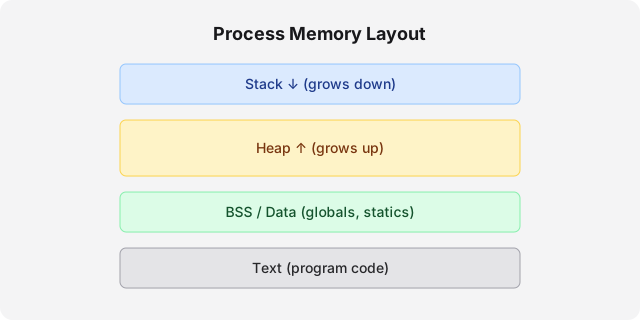
| Region | Lifetime | Managed by | Typical contents |
|---|---|---|---|
| Stack | Scope (automatic) | Compiler | Locals, return addresses |
| Heap | Manual / smart-ptr | You / RAII | new, dynamic containers |
| Data | Whole program | Loader | Globals, static vars |
| Text | Whole program | Loader (readonly) | Compiled instructions |
Prefer the stack. An object on the stack is destroyed automatically at the end
of its scope — no leaks, no double-frees, no delete to forget.
RAII — the organizing idea#
Resource Acquisition Is Initialization: tie a resource's lifetime to an object's lifetime. The constructor acquires; the destructor releases. Because destructors run deterministically at scope exit, resources are never leaked — even when an exception unwinds the stack.
class File {
public:
    explicit File(const char* path) : handle_(std::fopen(path, "r")) {
        if (!handle_) throw std::runtime_error("open failed");
    }
    ~File() { if (handle_) std::fclose(handle_); }   // released automatically

    File(const File&) = delete;                      // non-copyable
    File& operator=(const File&) = delete;

private:
    std::FILE* handle_;
};A class that manages a raw resource must address the Rule of Five: destructor, copy constructor, copy assignment, move constructor, move assignment. Get one wrong and you'll get double-frees or leaks.
In modern C++ you rarely write File by hand — std::unique_ptr with a custom
deleter and the standard containers already encapsulate RAII for you.
Never delete a pointer you got from a smart pointer's .get(). Ownership
still belongs to the smart pointer, which will free it again at scope exit.
Namespaces#
Namespaces prevent name collisions across large codebases. They are open — you can reopen the same namespace in multiple files to add to it.
namespace geometry {
    struct Point { double x, y; };
    double distance(const Point& a, const Point& b);
}

// Usage
geometry::Point origin{0.0, 0.0};
Avoid using namespace std; at file scope in headers — it leaks the entire
standard library into every file that includes you.1
Further reading#
- The ISO C++ Core Guidelines are the closest thing to an official style manual.
- cppreference is the reference you'll keep open.
Footnotes#
-
At narrow scope (inside a function),
usingdeclarations are fine and often improve readability. The rule is specifically about file or header scope, where the pollution is invisible to the next reader. ↩